Research Blog
How This Academic Website Is Organized
An academic website has several audiences. A colleague may want to understand my research, a student may be looking for courses or advising information, and a reader may arrive searching for a particular paper. I want this site to give each of them a clear starting point without turning the homepage into a complete CV.
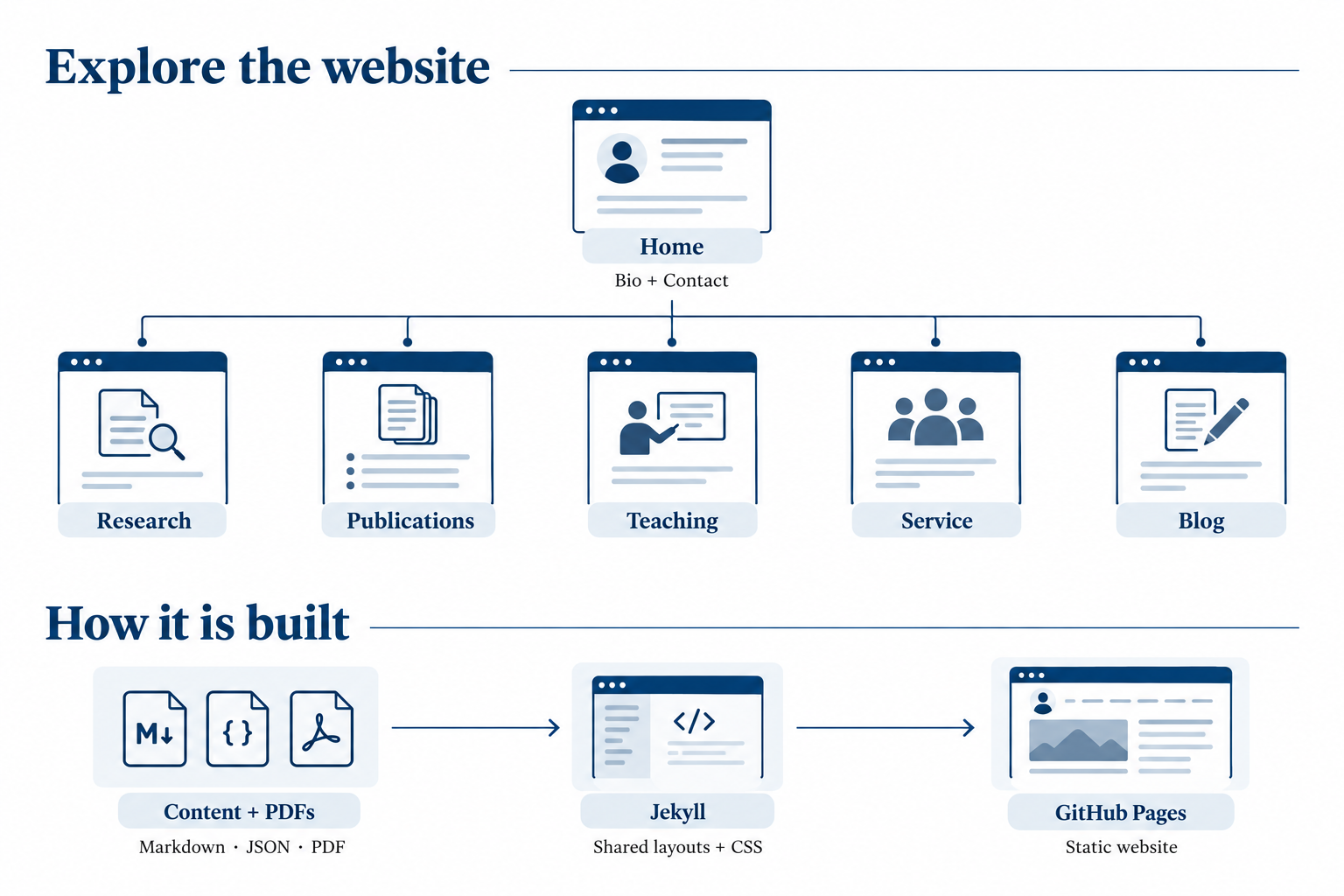
The structure follows a simple idea: introduce the person on the homepage, then give research, publications, teaching, service, and reflection their own spaces.
A Short Introduction, Then Direct Paths
The homepage brings together my bio, academic background, major achievements, and contact details. The top navigation links directly to each page, so readers can move to the information they need without first scrolling through a long overview.
The Research page describes three connected directions: conversational and explainable AI, generative AI in healthcare, and community-centered HCI and accountable AI. Each direction includes a statement of the questions I pursue and representative papers with short contribution summaries. Additional related papers remain available without crowding the main narrative.
I see that pairing as important: a research statement explains the program, while the publications provide evidence of how it develops through individual studies.
Making Papers Easier to Find
The Publications page serves as a searchable archive. Readers can search titles, authors, and topics, narrow the list by year or publication type, and open archived PDFs in a new tab. Where available, links to published records provide another route to the work. BibTeX files help readers cite it.
Behind the page, publication information lives in a structured data file, while PDFs sit in folders organized by publication type. This separates the bibliography from the presentation: adding a paper should require updating its entry and file, rather than rewriting a page layout. Descriptive filenames also make the archive easier to maintain.
Teaching, Service, and Ideas in Progress
The Teaching page connects my approach to computing education with courses and mentoring. The Service page describes contributions to university programs, scholarly peer review, and community engagement.
This blog has a different role. It is a place for thinking, reflection, and ideas that may not yet belong in a formal publication: a question from a paper, a lesson from designing a study, an observation from teaching, or an assumption worth revisiting. I want it to preserve some of the reasoning between finished research outputs.
A Simple Technical Foundation
The site is built with Jekyll. Blog posts are written in Markdown, publication and research information are stored in JSON, and shared templates and CSS give the pages a consistent structure and appearance. A GitHub Actions workflow builds the site and deploys it to GitHub Pages when changes are pushed to the main branch.
The result is a static website: its pages are generated before readers visit them. Publication search runs in the browser, and the full archive remains readable when JavaScript is unavailable. Blog addresses use descriptive titles, such as /blog/how-this-academic-website-is-organized/, rather than dates.
For me, the architecture is also a communication choice. It gives different kinds of academic work room to breathe while keeping the connections between them visible. I hope this space helps readers find a paper, understand a question, or begin a conversation.